MEDIEVAL STRATEGY Controls and Keybinds
PC and mobile inputs, selection habits, and the official castle-to-army loop.
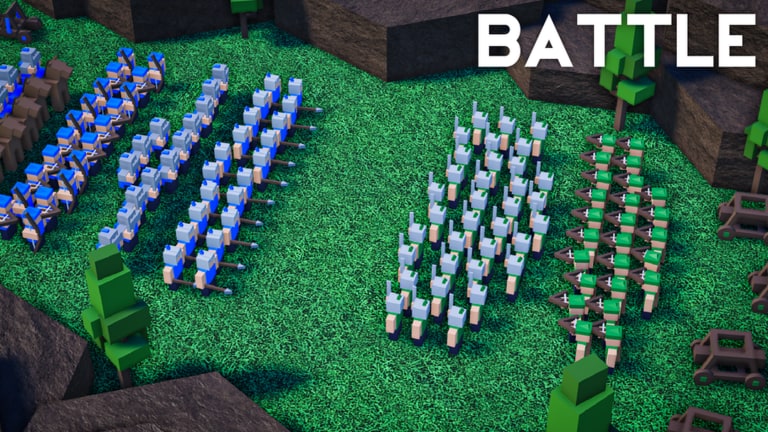
Clean inputs win more games than fancy unit theory in MEDIEVAL STRATEGY (Medieval RTS) by Spling on Roblox. This page is the control-focused companion to Getting Started: how you click or tap the castle, select builders, move groups, and stop wasting armies on every roadside skirmish. Pair it with Economy and Windmills, Army Composition, Unit Counters, Defense Towers, and How to Win. Browse the rest on the Guides Hub.
The mid-page video covers unit-control context in live fights so you can see how selection and pathing look once Barracks are online—not a substitute for the official basics below.
Official control loop (memorize this)
Spling’s game description spells out the intended sequence. Treat it as your keybind checklist even though most actions are click-or-tap rather than letter hotkeys:
- Choose a game mode — you spawn at your castle.
- Right-click or tap your castle — recruit a couple of builders.
- Click a builder to select it — move that builder to a nearby farm.
- Build a Windmill near the farm — that placement generates income.
- After three or more Windmills — build army structures (Barracks, Siege Workshop) and recruit units.
- Units auto-attack — destroy all enemy castles to win.
If you skip step order—especially Windmills before heavy recruiting—you will feel “broken controls” when the real problem is empty gold. Rehearse the loop until recruit → select → move → mill is muscle memory, then layer army micro on top.
PC versus mobile
On PC, right-click (or the equivalent context action on the castle) opens recruit options; left-click selects units and buildings; click-move issues travel orders. Use the camera freely so you can see farms beyond your walls before neighbors claim them. Selection habits matter: click the exact builder you intend to send, confirm the selection highlight, then click the farm destination. Mis-clicks that leave a builder idle next to the gate cost minutes of income.
On mobile, replace right-click with tap on the castle to recruit, then tap a builder to select and tap the farm (or build site) to move. Fingers are less precise than a mouse—zoom out enough to hit farms cleanly, and avoid frantic double-taps that cancel a move or open the wrong panel. If a builder ignores you, re-select and issue one clear destination instead of spamming taps.
Both platforms share the same economy truth: builders claim farms, Windmills convert claims into gold, and military unlocks after the three-plus Windmill threshold. Platform only changes how you issue those orders.
Camera, selection, and group habits
RTS play rewards a calm camera. Sweep farms and choke points every few seconds instead of locking the view on your castle forever. When multiple builders are out, select one, send it far, then select the next—do not assume a single click controls the whole workforce unless you have clearly multi-selected.
For armies later in the match:
- Select the group you want to commit, then order a destination that matters (enemy castle approach, defensive choke, or regroup point)—not every scrap with a stray swordsman.
- Remember auto-attack: once units meet enemies they fight on their own. Your job is positioning and target priority, not micromanaging every swing.
- Split attention: keep at least one eye on builders and Windmill sites while armies march. A perfect knight path means little if your mills stall.
Practice selecting small groups for harassment and larger blobs for castle deletes. Over-selecting everything into a random edge fight is the most common control mistake after bad mill timing.
Ordering moves without fighting every skirmish
New players treat every contact as a duel. Strong players issue move orders past low-value fights when the win condition is elsewhere. If a neighbor’s three swordsmen poke your road while an undefended castle sits two plots away, path the main force toward the castle and leave a cheap screen or tower for the poke—see Defense Towers and Unit Counters for what that screen should be.
Practical habits:
- Issue a clear march toward the objective, then only re-select if the path collapses.
- Do not yank the whole army back for every side skirmish; that is how castle races are lost.
- When you do engage, let auto-attack work and focus on reinforcing or retreating as a group.
This discipline pairs with Army Composition timings (knight rushes, mage wagon balls) and the conversion tips in How to Win.
Matchmaking, Ranked, and practice servers
Matchmaking groups roughly levels 1–5 and levels 6+. Ranked unlocks after level 7. Use the lower bracket to rehearse controls without Ranked pressure: recruit speed, farm clicks, mill placement, and clean army marches. After level 7, the same inputs must be faster because lobbies punish idle builders harder.
Private server owners with the relevant game pass get access to various owner commands. Use that sandbox to practice selection, multi-builder paths, and castle approaches without public chaos. Drill the official six-step loop until you never forget Windmill three before Barracks spam. Public lobbies then become execution tests, not tutorials.
Track seasonal notes on Updates, roster context on Players, promo strings on Codes, and optional community tooling on Scripts—none of those replace clean castle clicks.
Control checklist before every match
- Mode chosen; castle spawn with room for farms and mills.
- Right-click or tap castle → recruit builders immediately.
- Select each builder deliberately; send them to farms.
- Place Windmills beside claimed farms; hit three or more before heavy military.
- Unlock Barracks / Siege Workshop; recruit with Houses supporting capacity.
- Select army groups with purpose; march to castles; trust auto-attack in contact.
- Skip worthless skirmishes; protect eco while you push.
Master these controls and every other guide on this wiki becomes easier to apply. When recruit, select, move, and mill feel automatic, graduate deeper into Economy and Windmills and the combat pages linked above, then return here whenever a losing streak looks like “I clicked the wrong thing” instead of “I built the wrong army.”
Frequently Asked Questions
Quick answers to the most common questions.
How do I recruit builders in MEDIEVAL STRATEGY?
Right-click your castle on PC, or tap the castle on mobile, then recruit builders. Select a builder and move it to a farm before placing a Windmill nearby.
Do units need constant attack clicks?
No. Units auto-attack once they engage enemies. Focus on selection, pathing, and which castle you are marching toward.
When can I build Barracks and the Siege Workshop?
After you have three or more Windmills. Recruiting hard before that threshold usually stalls your gold and housing.
What are the matchmaking brackets and Ranked unlock?
Matchmaking uses roughly levels 1–5 and 6+. Ranked unlocks after level 7—practice controls in earlier brackets first.
What do private server owner commands do?
Private server owners with the game pass get various owner commands for practice. Use them to rehearse builder paths and army marches without public lobby pressure.